The 7 Best USB Condenser Mics (2026) for Sound Quality and Price
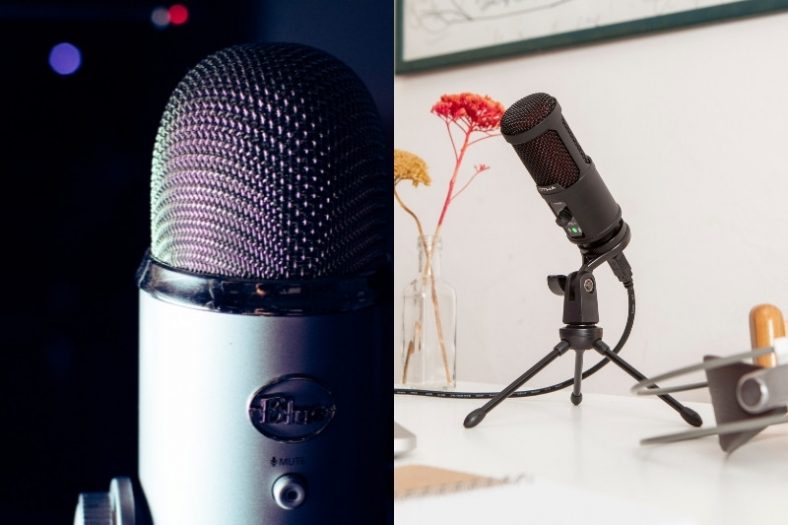
USB condenser mics make it easy to record without a separate audio interface. They started as a convenient alternative to XLR setups, and there are now plenty of good-sounding options for vocals, instruments and spoken recordings.
While the biggest selling point of a USB condenser mic is the ease of plug and play, it also needs to have a certain clarity and value for money. So, today, I’m going to look at the best USB microphones that offer great sound quality and are worth the price.
My top recommended USB condenser microphone is the Apogee Hype Mic, an overall great USB condenser mic with a built-in compressor feature and delivers clear recorded vocals.
My second recommended USB condenser microphone is the Blue Snowball iCE. It’s a small and budget-friendly mic that’s great for personal use.
Contents
- The 7 Best USB Condenser Mics (2026)
- 1. Apogee Hype Mic
- 2. Blue Snowball iCE
- 3. Blue Yeti
- 4. Rode NT-USB+
- 5. AKG Lyra
- 6. Audio-Technica AT2020USB-X
- 7. HyperX QuadCast 2 S
- What is a USB Condenser Microphone and how does it work?
- What is the difference between USB mics and XLR mics?
- What is the difference between a conventional USB mic and a Condenser USB Mic?
- What is the optimal positioning of a USB Condenser Mic?
- What to look for in a USB Condenser Mic when buying?
- Verdict
The 7 Best USB Condenser Mics (2026)
Let’s compare these in more detail.
1. Apogee Hype Mic
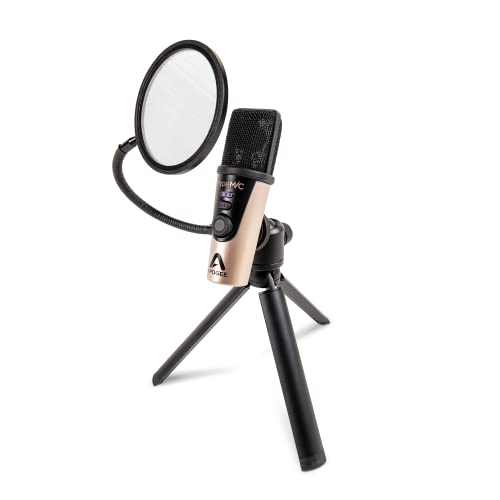
The Apogee Hype Mic is a USB condenser mic with a built-in compressor. The microphone sits on the higher-end scope of USB mics but boasts great specs and hails from a respectable company.
Pros
- Built-in analog compressor
- Great signal and quality performance with added level indicator
- Portable mic with good tripod stand and pop filter
- Zero-latency audio monitoring
Cons
- Pricey for a USB mic
- Only has Micro USB jack
The Hype Mic, while pricey compared to other USB mics on the market, has a Micro-USB socket, but the box includes cables for USB-C, USB-A and Lightning devices.
On the plus side, this microphone offers superb clarity when recording, and the portability, along with a sturdy tripod stand, and pop filter result in an all-in-one great USB mic bundle. The included cables cover USB-C, USB-A and compatible Lightning devices, so check which connection your phone or computer needs.
| Recording resolution | Up to 24-bit / 96 kHz |
| Maximum SPL | 130 dB |
| Impedance | N/A |
| Polar pattern | Cardioid |
| Material | Aluminum |
The Hype Mic is a well-rounded USB condenser mic that is well worth the money. With zero-latency audio monitoring, portability, quality, and the compressor feature, this is a useful all-in-one recording choice if its analog compressor suits your workflow.
2. Blue Snowball iCE
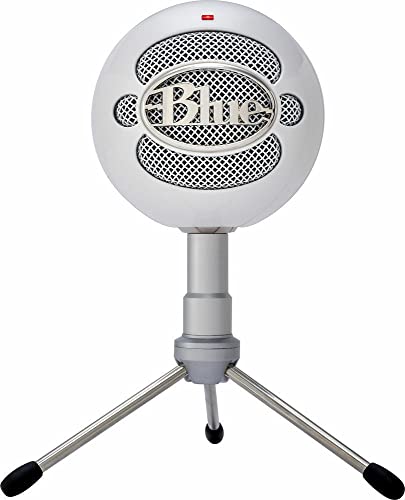
The Blue Snowball iCE is a simple budget USB mic for content creators. This is the single-pattern iCE version, with a white finish here, rather than the original Snowball with switchable recording modes.
Pros
- Budget-friendly USB recording
- Simple cardioid pickup for speech
- Adjustable desktop stand included
Cons
- No headphone output or hardware gain control
For anyone currently using their in-device mic, its cardioid capsule is a useful upgrade for spoken recordings. Point the front of the mic towards your mouth and keep it fairly close; it still hears room noise, so a quiet space helps more than turning the recording level up.
The small, round mic comes with an adjustable desktop tripod. You can angle it towards your voice for video calls, streaming or a basic voiceover without buying an audio interface. Its 16-bit/44.1 kHz recording is enough for those jobs, although the other picks give musicians more control.
There is no headphone socket for direct monitoring and no gain knob on the mic. You set the recording level on the computer, which makes it less convenient when your voice level changes. Choose it for a straightforward spoken-word setup rather than a recording rig you want to adjust during a take.
| Recording resolution | 16-bit / 44.1 kHz |
| Polar pattern | Cardioid |
| Connection | USB |
| Direct monitoring | No |

3. Blue Yeti
Another Blue microphone on the list, the Yeti is a higher-quality product than the Snowball while still being fairly affordable. It is also a great one for content creators, but those who do it more frequently or seriously.
Pros
- Has a lot of applications
- Four pickup patterns give you total control
- Blue VO!CE software for effects and samples
Cons
- The large desktop stand takes up space and can transmit desk vibrations
The Blue Yeti is a great and very popular starter mic. It comes with the Blue VO!CE software that has vocal effects, advanced modulation, and solid audio samples. You can do a lot of experimentation with it.
The best thing about this mic is its four pickup patterns, cardioid, omnidirectional, bidirectional, and stereo. Add to this onboard audio controls, and you have complete control over the sound production.
| Frequency range | 20 Hz – 20 kHz |
| Maximum SPL | 120 dB |
| Impedance | 16 ohms |
| Polar pattern | Cardioid, Omni, Bidirectional, Stereo |
| Material | Metal |
The mic is nice and stable with a flat stand. You can also adjust the position and angle it to your liking. The whole thing makes it super convenient to use. A more affordable option is the Blue Yeti Nano version which is worth considering.

4. Rode NT-USB+
For musicians wanting to record vocals at home, the Rode NT-USB+ keeps the straightforward approach of the original NT-USB and adds USB-C connectivity. It is also a useful choice for radio-style speech and podcasts, especially if you want a pop filter and desktop stand in the box.
Pros
- USB-C and 24-bit recording
- Direct headphone monitoring with mix control
- Pop filter and desktop stand included
- Onboard DSP through compatible Rode apps
Cons
- No physical microphone gain knob
The cardioid condenser capsule suits a controlled recording space. Its 20 Hz to 20 kHz frequency response covers voice and acoustic instruments, while the newer Revolution preamp and 24-bit/48 kHz conversion give it a more capable recording path than the original 16-bit model.
There are two controls on the side for headphone volume and the balance between the direct mic signal and computer playback. The 3.5 mm headphone socket lets you hear yourself without the delay of monitoring through a recording app. Microphone gain is adjusted through software rather than a physical gain knob.
The supplied metal pop filter helps with breath blasts when recording speech or singing. A ring mount, desktop tripod and 3 m USB-C cable are included. A separate boom arm is still useful if your desk position leaves the microphone too low.
Its onboard DSP includes a high-pass filter, compressor and noise gate, with additional processing available through compatible Rode apps. You can start with a clean recording and explore those tools later. Overall, this is a sensible USB-C option when you want home-recording detail and proper monitoring without a separate interface.
| Frequency range | 20 Hz – 20 kHz |
| Recording resolution | 24-bit / 48 kHz |
| Maximum SPL | 118 dB |
| Polar pattern | Cardioid |
| Connection | USB-C |

5. AKG Lyra
The AKG Lyra is a really handy mic for home use. It’s great for podcasting, recording music, or YouTube videos with its Ultra HD sound. You can see the full review of this affordable yet quality USB microphone.
Pros
- Four capture modes and control knobs for versatility
- Internal Element Overload Protection gives higher clarity
- Awesome compatibility with any device
Cons
- Plastic knobs are kind of quirky
- Pickup can be too sensitive
There are four capture modes on the AKG Lyra, wide stereo, tight stereo, front, and front & back. With these pickup patterns, you get a lot of freedom to record as you like. You have gain control and volume control as well as a mute button.
Another great thing about the AKG Lyra is the AKG Internal Element Overload Prevention. It’s an internal shock mount and built-in sound diffuser that rejects a lot of noise and optimizes signal levels. So, you get a nice, clear sound out of your mic.
Check out our AKG Lyra review to learn about it in more detail.
| Frequency range | 20 Hz – 20 kHz |
| Maximum SPL | 129 dB |
| Impedance | 16 ohms headphone impedance |
| Polar pattern | Front, Front+Back, Wide Stereo, Tight Stereo |
| Material | Plastic |
It is compatible with Windows, macOS, and Android. This makes it so convenient to set up wherever you are with whatever device you have. And with the headphone output, you can monitor your input free of any latency.

6. Audio-Technica AT2020USB-X
The Audio-Technica AT2020USB-X makes recording at home accessible with a USB-C connection and familiar hands-on monitoring. It takes over this role from the AT2020USB+, adding higher-resolution recording, a touch-sensitive mute button and a more substantial desktop base.
Pros
- Up to 24-bit/96 kHz recording
- Direct monitoring and playback mix control
- Touch-sensitive mute button
- USB-C connection and desk stand
Cons
- No physical microphone gain knob
Its cardioid capsule is a good fit for recording one voice or acoustic instrument. The front-addressed recording position helps you focus on the source, although it still pays to reduce room reflections and position the mic carefully. Conversion now reaches 24-bit/96 kHz, rather than the older model’s 16-bit/48 kHz ceiling.
You can control headphone volume and blend the direct microphone signal with computer playback. That is useful when singing or speaking over an existing backing track, because you can hear the live input without waiting for it to pass through your software.
The touch mute button is handy between takes or during calls, and the indicator changes colour when the mic is muted. There is no physical gain knob: set the recording level in your computer or recording app before starting a performance.
The supplied desk stand keeps the setup simple, and a thread adapter lets you move to a suitable mic stand. A 2 m USB-C to USB-A cable and USB-A to USB-C adapter are included. For a musician who needs one dependable USB mic rather than switchable pickup patterns or lighting, this is a practical choice.
| Frequency range | 20 Hz – 20 kHz |
| Recording resolution | Up to 24-bit / 96 kHz |
| Polar pattern | Cardioid |
| Connection | USB-C |
| Weight | 373 g |

7. HyperX QuadCast 2 S
The HyperX QuadCast 2 S is a good choice if the microphone will be part of a visible streaming setup. It updates the QuadCast S with more adjustable RGB lighting and a multifunction control, while keeping the four pickup patterns and included shock mount that made the original useful.
Pros
- Four selectable pickup patterns
- Tap-to-mute with visible status
- Included removable shock mount
- Onboard gain and monitoring controls
Cons
- NGENUITY customisation requires supported Windows software
You can choose cardioid for a single voice, bidirectional for two people sitting opposite each other, omnidirectional for a group, or stereo for a wider recording. Those choices give it more flexibility than a single-pattern mic, although they do not replace careful placement in a quiet room.
The detachable shock mount reduces vibration travelling from the stand into the microphone. A tap on top mutes the input, and the lighting makes the mute state visible during a stream. There is also a headphone socket for direct monitoring.
The multifunction knob controls mic gain, headphone volume, monitor mix and polar-pattern selection. That keeps the front tidy, but you need to select the right function before making an adjustment. HyperX NGENUITY provides deeper lighting customisation on supported Windows systems; Mac users can use the microphone without getting the same software controls.
Recording reaches 32-bit/192 kHz, although that is not a reason on its own to choose this mic over a simpler model. Its real appeal is the combination of visible mute feedback, flexible pickup, monitoring and a supplied stand. Choose it when those streaming controls and lighting matter to your setup.
| Frequency range | 20 Hz – 20 kHz |
| Recording resolution | Up to 32-bit / 192 kHz |
| Polar patterns | Cardioid, Omnidirectional, Bidirectional, Stereo |
| Connection | USB-C |
| Headphone monitoring | Yes |
What is a USB Condenser Microphone and how does it work?
A USB condenser microphone gets its power supply from a USB cord, as opposed to an XLR cable. USB mics have an in-built analog to digital converter. Because of this, they do not require any external interface to translate the input signal.
USB mics are extremely convenient to use as all you have to do is plug in the cable and get started. And the USB cable comes along with the mic.
What is the difference between USB mics and XLR mics?
As far as the components are concerned, both USB and XLR mics share a lot of common ground. The biggest difference is the in-built A/D converter in USB mics. Most XLR condenser mics need phantom power from an interface or mixer; many dynamic XLR mics do not.
An XLR setup lets you choose the microphone, preamp and converter separately. That gives you more upgrade options, but the connector alone does not make a microphone sound better.
USB mics can be cost-efficient for a single recording source. An XLR interface is more flexible when you need several microphones, separate inputs or room to expand your studio.
What is the difference between a conventional USB mic and a Condenser USB Mic?
There are two main types of mics, dynamic and condenser. And the difference is in the capsule. Dynamic mics are often chosen for live vocals and loud instruments because many models tolerate rough handling and high sound levels.
The condenser mic is great for softer audio like vocals or guitars. It picks up a lot more details than a dynamic mic, making it ideal for studio recordings.
What is the optimal positioning of a USB Condenser Mic?
As with all microphones, you want to keep a USB condenser mic at a slight angle from your audio source. That could be your mouth or an instrument.
Since condenser mics are quite sensitive, keeping them too close might result in a lot of low-end pickups, which doesn’t sound very nice in the recording. On the flip side, if your mic is too far, your audio might get muffled in the background noise of your surroundings. The best position would be 4 to 12 inches from you. Try different distances and see what works for you.
What to look for in a USB Condenser Mic when buying?
Choosing a great mic, particularly a USB condenser mic isn’t the easiest task. The best way to start is to go to an actual store and try it out on the spot. Naturally, look at the specs. Frequency range is useful, but a 20 Hz to 20 kHz specification alone does not tell you whether a mic sounds balanced. Listen to its response on a voice or instrument like yours and consider the room you will record in.
You also want to see what or how many polar patterns are available. More polar patterns mean a wide range of applications.
Next, you want to get your money’s worth. Although USB mics are generally on the cheaper side, no one knows your budget better than you. If your mic use is very limited, then you could make do with a budget mic. However, if you’re serious about content creation, consider an expensive mic as an investment.
You also want your microphone to be durable. Go for a metal body instead of plastic as the former is almost always better. Apart from all this, you might want to look at additional features like a headphone jack for zero-latency monitoring, mic stands, and pop filters for better recording quality.
Verdict
USB microphones are a great option for those looking for an easy-to-use, cost-effective solution. They work well for home recording, voiceovers and streaming when one microphone is enough. An XLR setup gives you more choice of preamps and multiple inputs if your recording needs grow. The list above lists some of the best USB mics on the market today.
My top USB condenser microphone is the Apogee Hype Mic. A higher-end USB mic compared to others but comes with a built-in compressor, quality bundle, and offers clear recordings.
My budget USB condenser microphone is the Blue Snowball iCE, it’s a nice, inexpensive option without compromising the sound quality.