The 10 Best MIDI Controllers (2026)
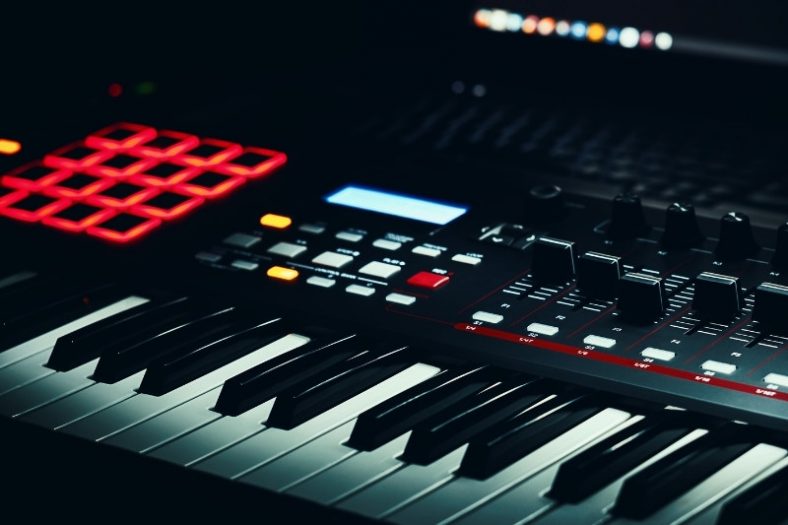
MIDI controllers are versatile pieces of gear that allow you to control the functions and sounds of your DAW, VST plugins, and other synths, making them essential in any modern studio. By connecting them to your computer via USB or Bluetooth, you can have a much easier process for music production.
MIDI controllers come in different shapes and features. Still, all give you the editing freedom and ease of use to create music. MIDI Controllers take your recording sessions to another level with the feel of physical touch and features that make the whole process easier and more efficient.
My top MIDI controller pick is the Arturia KeyStep Pro, a strong hardware-sequencing keyboard for players with synths and modular gear.
For a portable beat-making setup, my compact pick is the Akai Professional MPK Mini IV Black, an entry-level yet feature-packed and portable MIDI keyboard with a great value for the offered price.
Contents
- The Best MIDI Controllers (2026) – At A Glance
- 1. Arturia KeyStep Pro
- 2. Akai Professional MPK Mini IV Black
- 3. Native Instruments Komplete Kontrol A49
- 4. Novation Launchkey Mini 25 MK4
- 5. Nektar Impact LX25 mk3
- 6. M-Audio Keystation 49 MK3
- 7. Arturia MiniLab 3 Deep Black
- 8. Xkey 25
- 9. Korg microKEY Air-25
- 10. M-Audio Oxygen 61 (MKV)
- What are MIDI controllers?
- What are the different types of MIDI controllers?
- Does key size make a difference?
- How many keys would be enough?
- What to look out for when buying a MIDI controller?
- Do the more controls mean the better the controller?
- Conclusion
The Best MIDI Controllers (2026) – At A Glance


And now onto the full list:
1. Arturia KeyStep Pro
Arturia KeyStep Pro is my top pick for a hardware-centered studio, where its sequencer and generous connections matter most. It features 37 slim keys with synth action and aftertouch, tons of connectivity options, a 24-part drum sequencer, drum triggers, four CV, gate, and mod outs, and the ability to control hardware synthesizers.
Pros
- Versatile and easy to use layout
- Many connectivity options
- Great sequencer and arpeggiator
- Durable and portable design
Cons
- Slim keys may feel too small for some players
- Small touch strips
All these features on a portable and sturdy design with an easy-to-use layout create one of the best MIDI keyboard controllers in the price range for beginners as well as experienced musicians. The sequencer and arpeggiator are the shining stars of the MIDI controller, and the 4-track polyphonic step sequencer is highly versatile.
My only complaint is the size of the keys and touch strips, as they may be an issue for big-handed players. But, they are not hard to get used to if your hands are not gigantic.
| Connectivity | USB,MIDI In, 2 x Out,3 x 1/8″ (clock in, out, reset),8 x 1/8″ (drum gate out),12 x 1/8″ Voices 1-4 (CV out, gate out, mod out) |
| Compatibility | Windows 7 or later,MacOS 10.8 or later |
| Key Size | 37 Slim keys |
| Key Type | Synth Action, Velocity-sensitive with Aftertouch |
| Controls | Pitchbend & Modulation Touchstrips with Looper Control, 5 x Encoders |
Overall, Arturia KeyStep Pro is a great MIDI controller with lots of versatile features, making music production much easier and more fun.
2. Akai Professional MPK Mini IV Black
The MPK Mini IV is the small beat-making controller I would pick for producers who need pads and hands-on performance controls in a bag-friendly format. Its 25 mini keys keep the footprint small, while eight pads make drum programming more immediate than mouse entry.
Akai has moved this fourth generation beyond the older MK3 with dedicated pitch and modulation wheels, USB-C and a five-pin MIDI output. The new controls matter if you want to play external hardware as well as software instruments. The small keys are a trade-off for travel, not a substitute for a piano-style keybed.
Choose this for mobile beat production. For a deeper Ableton workflow, the Launchkey Mini below is a better fit; for a full-size keyboard, consider the Keystation 49.
Pros
- Portable keys and responsive pads
- Pitch and modulation wheels
- Five-pin MIDI output
Cons
- Mini keys limit two-handed parts
- Check local availability for this new model
Specifications: 25 mini keys; eight pads; USB-C; five-pin MIDI output.
3. Native Instruments Komplete Kontrol A49
Native Instruments Komplete Kontrol A49 is a streamlined 49-key choice for a producer who uses Komplete or other NKS instruments. Its semi-weighted keys and preset browsing make it a useful writing controller, while supported DAW integrations handle common transport tasks.
Pros
- Great keybed and build quality
- Good software bundle
- Quality keyboard for the price
- Easy to use, pre-mapped with major DAWs
Cons
- Keys without aftertouch
- Fewer features and controls
The Native Instruments Komplete Kontrol A49 features a great keybed with 49 semi-weighted keys, 8 touch-sensitive control knobs, a pitch-bend, a modulation wheel, and a 4-way push encoder.
The A49 includes Komplete Select and Ableton Live Lite after registration, along with hands-on browsing for compatible NKS instruments. It has fewer features and controls than other controllers, but it is more than enough for entry-level music production.
| Connectivity | USB,1 x 1/4″ TRS (sustain/expression) |
| Compatibility | Windows 10 or later,MacOS 10.12 or later |
| Key Size | 49 full-sized |
| Key Type | Semi-weighted |
| Controls | 8 x Touch-sensitive Control Knobs, 4-way Push Encoder, 1 x Pitch-Bend Wheel, 1 x Modulation Wheel |
If you are a Native Instruments or NKS plug-ins user, this MIDI controller is a great choice as it offers convenient browsing and pre-mapped control of Komplete and NKS software. But as it is well-integrated with other major DAWs, it is a quality, well-rounded keyboard for the offered price.
4. Novation Launchkey Mini 25 MK4
The Launchkey Mini 25 MK4 is the stronger compact choice for a producer who builds tracks inside Ableton Live. Its pads, encoders and transport controls keep common recording and clip tasks close to the keyboard. It also works with other supported DAWs, so the Ableton focus does not lock you into one setup.
The fourth generation adds new performance tools and a clearer control layout over the earlier MK3. Its mini keys keep the unit portable; they are less comfortable for extended two-handed playing than the full-size keys on the Keystation or Oxygen below.
I would choose it over the Akai MPK Mini IV for DAW integration and scale/chord tools, while the Akai has a stronger hardware-MIDI and beat-pad appeal.
Pros
- Deep DAW controls
- Pads and creative scale/chord tools
- Compact travel size
Cons
- Mini keys are less suited to piano parts
- European stock is on short backorder
Specifications: 25 mini keys; 16 pads; eight encoders; USB-C MIDI.

5. Nektar Impact LX25 mk3
The Impact LX25 mk3 fills the affordable full-size-key role. Its 25 synth-action keys leave room for a compact desk setup without making every chord feel like a mini-key compromise. The pads and encoders put drum input and plugin control within reach.
Its redesigned keybed, chord and scale functions, and NKS support are useful additions for a compact studio. Nektar’s deeper DAW integration is available in supported hosts; check the current compatibility list for your software.
Choose this over the Launchkey Mini if key width matters more than backpack size. A player who needs a wider playing range should move to the Keystation 49 or Oxygen 61.
Pros
- Full-size keys in a compact layout
- Pads and encoders
- Chord, scale and NKS functions
Cons
- Only two octaves of keys
- DAW integration varies by host
Specifications: 25 full-size synth-action keys; eight pads; nine encoders; no faders; USB-C MIDI.

6. M-Audio Keystation 49 MK3
M-Audio Keystation is one of the most sold MIDI controllers globally, thanks to their versatility, simplistic no-frills, easy-to-use design, and durable, lightweight construction. It is an affordable device that comes with a great software bundle.
Pros
- Simplistic, no-frills design, easy to use
- Great software bundle
- 49 full-size synth-action keys with velocity sensitivity
- Durable and lightweight
- Affordable
Cons
- Relatively few features
- No aftertouch
There are 49 full-size synth-action keys with velocity sensitivity on the keyboard, pitch bend, mod wheels, and a volume fader. There are few control knobs or extra features on the device, making it easier to use but less versatile.
One other drawback would be the lack of aftertouch on the MIDI controller which is quite a turn-off for many MIDI users out there, however, not a major dealbreaker, in my opinion.
| Connectivity | USB,1 x 1/4″ (sustain) |
| Compatibility | Windows,macOS,iOS |
| Key Size | 49 Full-size |
| Key Type | Synth-action, velocity-sensitive |
| Controls | Pitchbend and Mod Wheel, Volume fader |
M-Audio Keystation 49 MK3 is a great MIDI controller for newcomers to the music production world. For such an affordable price, it comes with great DAWs like Ableton Live Lite and MPC Beats, and the simplistic design is great to explore and get familiar with the music production progress.

7. Arturia MiniLab 3 Deep Black
The MiniLab 3 is a welcoming compact controller for a first software studio. Its 25 slim keys, eight pads, encoders and faders give a beginner several useful ways to play and shape sounds without filling the desk. Arturia software integration is the real advantage over an older bare-bones budget pick.
USB-C handles computer connection, while the five-pin MIDI output gives a route to external hardware. The slim keys feel different from the full-size keys on the LX25 mk3, so choose that model if key width is your priority.
Choose it for a software-first setup and tactile sound shaping. The LX25 mk3 has wider keys, while this Arturia gives you faders and a strong instrument-browser workflow in a smaller footprint.
Pros
- Useful software and control layout
- USB-C and five-pin MIDI output
- Four faders for hands-on mixing
Cons
- Slim keys are not piano-sized
- Only 25 keys
Specifications: 25 slim keys; eight pads; eight encoders; four faders; USB-C; five-pin MIDI output.

8. Xkey 25
Xkey 25 is a simple MIDI keyboard with a lightweight and portable design which features a great set of 25 full-size velocity-sensitive keys with polyphonic aftertouch. The controller shines with its good playability and simple design without bells and whistles.
Pros
- 25 full-size velocity-sensitive keys with polyphonic aftertouch
- Lightweight and portable, high-quality build
- Good playability
Cons
- Pitchbend and mod buttons are hard to control
- No pads, knobs; few controls
- Micro-USB rather than USB-C
There are no pads or knobs on the keyboard but a pitch bend and a mod button. They are pretty hard to get used to as they are often controlled with wheels. Also, the lack of control options makes the controller less versatile.
The class-compliant CME Xkey also works with Windows and Linux computers. Its thin aluminum body and full-size keys make it a useful travel option when pads and knobs are unnecessary.
| Connectivity | USB |
| Compatibility | macOS, Windows, Linux, iOS and Android with a suitable USB connection |
| Key Size | 25 Full-size |
| Key Type | Synth-action, velocity-sensitive with aftertouch |
| Controls | Pitch-Bend Button, Modulation Button |
If you need full-width keys and polyphonic aftertouch in a very thin travel controller, Xkey 25 offers a distinct choice. Its button-based pitch and modulation controls take more practice than conventional wheels.

9. Korg microKEY Air-25
The Korg microKEY Air-25 earns the wireless slot because its Bluetooth MIDI connection lets you sketch parts without a USB cable across the desk. USB remains available when a wired connection is more reliable for a session.
Its 25 mini keys and compact housing suit travel and quick ideas rather than sustained two-handed performance. The joystick handles pitch and modulation, but there are no drum pads or mixer faders; take the MPK Mini IV or MiniLab 3 if those controls matter more.
Choose the Korg when cable-free sketching matters more than beat pads or faders. Bluetooth can add latency or connection setup, so use USB for timing-critical recording. Availability varies by region; check the exact Air-25 model before ordering.
Pros
- Bluetooth and USB MIDI
- Small travel-friendly footprint
- USB fallback for wired sessions
Cons
- Bluetooth setup and latency vary by device
- No pads or faders
Specifications: 25 mini keys; Bluetooth MIDI; USB MIDI; pitch/modulation joystick.
10. M-Audio Oxygen 61 (MKV)
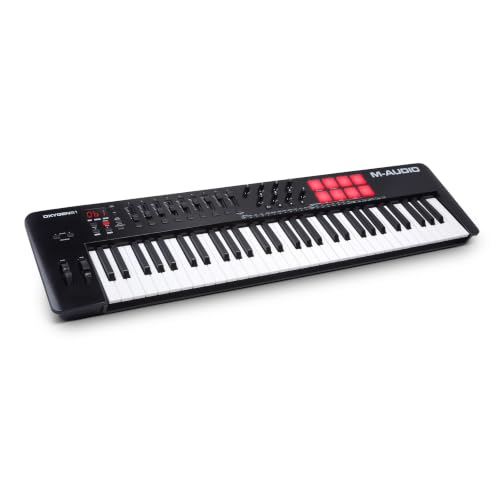
The biggest member of the Oxygen series, M-Audio Oxygen 61, is a MIDI keyboard with 61 full-size synth-action keys with velocity sensitivity, a generous amount of control options, and nice features like smart chord and arpeggiator modes.
Pros
- Arpeggiator and smart chord functions add to the ease of use
- A good amount of controls
- Comes with a good software bundle
- 61 full-size synth-action keys with velocity sensitivity
Cons
- Keys without aftertouch
- Non-weighted keys
- Knobs and controls are hard to see in the dark
The controller comes with a good software bundle and features easy integration for major DAWs of your choice. The non-weighted keys are a drawback depending on your needs as they don’t provide an authentic piano feel but are good for percussion and synth playing.
Another potential drawback for some would be that the knobs and controls are kind of hard to see in the dark, making the whole process a bit stale and inconvenient.
| Connectivity | USB,1 x 1/4” (sustain pedal) |
| Compatibility | OS X 10.11.6 or laterWindows 7 SP1 or later |
| Key Size | 61 Full-size |
| Key Type | Synth-action, velocity sensitive |
| Controls | 8 x Back-lit Pads, 8 x Assignable Knobs, 9 x Assignable Faders |
To summarize, M-Audio Oxygen 61 (MKV) is a great controller with a wide range of notes, good control options, and smart features for a relatively affordable price to maximize your composing possibilities.
What are MIDI controllers?
MIDI controllers are devices that interact with DAWs to make music production easier. By sending MIDI messages to DAWs on PCs or MIDI-enabled devices, MIDI controllers are used to trigger sounds via your plugins or virtual instruments to play music or control the DAW features.
You can also produce music with a computer keyboard using the buttons, but MIDI controllers are specially designed devices to make this process easier. They have different features like keys, knobs, sliders, buttons, pedals, and other sensors, along with smart features like arpeggiators to interact with the DAWs and produce music more efficiently.
What are the different types of MIDI controllers?
There are many types of MIDI controllers such as MIDI keyboards, DJ controllers with MIDI compatibility, percussion-drum pads, mobile MIDI controllers, and instrument-shaped controllers such as guitar and wind MIDI controllers.
MIDI keyboards are the most popular MIDI controllers, which look like electronic keyboards with different numbers of keys and extra controllers like wheels, knobs, and pads. They need to be connected to a DAW, or an instrument sample must be loaded into them to trigger sounds.
Some DJ controllers are MIDI compatible, which you can use integrated with your DAW, reaching more sonic possibilities and features.
A percussion pad or a drum pad is another type of MIDI controller that features a different number of pads and controllers on them, which you can assign a different sound from your DAW.
Lastly, MIDI wind instruments are often saxophone-shaped electronic MIDI controllers. You can assign different sounds to the notes and play them like a wind instrument blowing in them. The same structure goes for MIDI guitar instruments; they are MIDI controllers in the shape of a guitar to reach different sonic possibilities by playing a physical guitar-shaped MIDI device.
Does key size make a difference?
The key size is important for ease of use and portability. MIDI keyboards with smaller keys are harder to play, especially for big hands, while full-size keys replicate the piano feel much better. However, a smaller key size means more portability and more keys on a tiny keyboard.
You should analyze your needs well to choose the size and the number of keys. If you want portability and if you want to use the MIDI keyboard for basslines, synths, and drum lines, you can go for a small size limited number of keys. But if you want to use it like a piano, you should go for larger keyboards with full-size keys.
How many keys would be enough?
To use a MIDI keyboard like a piano, you should go for larger keyboards like 49 or 61 keys. But, if you will use it just for bass and drum lines, synths, and lead, playing a 25-key would be enough. So, enough number of keys heavily depends on your needs.
What to look out for when buying a MIDI controller?
When buying a MIDI controller, you should look for compatibility, connectivity options, controls, portability, and price. These features heavily depend on your needs, so you have to analyze your needs and budget to find the most suitable one.
Compatibility refers to operating systems the MIDI controller can work with, such as Windows, Mac OS X for computers, and iOS and Android for smart devices.
Connectivity options are the input and output ports of a MIDI controller, which allows you to connect computers, smart devices, or MIDI-enabled devices and extra gear to the controller. Depending on your device and software, you should choose a suitable MIDI controller taking the compatibility and connectivity into account.
Controls are the number of keys, pads, wheels, knobs, and other sensors, which allow you to trigger sounds or control features in your DAW. Depending on your needs, more control means more versatility and can make the music production progress more efficient.
Portability is another important factor if you want to use your MIDI controller outside your studio. Smaller controllers are often more portable, but they have fewer controls which means less versatility.
And finally, the price is an important factor as always. If you have a tighter budget, you should go for the feature-packed smaller devices with a good value-for-price ratio. Or you can analyze your needs and sacrifice some features to have precisely the ones you need on your preferred MIDI controller.
Do the more controls mean the better the controller?
More controls do not necessarily mean the better the controller. More controls add more versatility and possibilities to the controllers, but it comes down to what you need and don’t need. If you don’t use the additional controls, they will only make things more confusing and the controller-less portable.
Conclusion
MIDI controllers are the crucial elements of music production today. They integrate greatly with DAWs making the production more efficient and easier, giving you almost endless sonic possibilities to explore.
My top pick is the Arturia KeyStep Pro, a strong choice for hardware sequencing, synths and modular gear.
For musicians looking for a budget-friendly option, I recommend the Akai Professional MPK Mini IV Black, one of the most popular entry-level MIDI keyboards with a great value for the price.