The 15 Best Free Guitar Tuner Apps for Android and iOS

Guitar tuner apps are a convenient way to tune at home or before practice. These free Android and iOS options use your phone’s microphone to show whether a note is sharp or flat. A quiet room helps; on a noisy stage, a clip-on tuner or pedal is usually easier to use.
There are many guitar tuner apps available online, so we’ve decided to make a list of some of the best ones for both Android and iOS.
All of these apps have a free download or free tuning option. Some include ads, paid upgrades or subscriptions, so a free tuner does not necessarily include every alternate tuning or practice tool. They run as standalone phone apps; you do not need a DAW, plugin host or audio interface.
Contents
- 1. GuitarTuna
- 2. Fender Tune
- 3. Guitar Tuner – Chromatic
- 4. Pano Tuner
- 5. BOSS Tuner
- 6. gStrings
- 7. Pitched Tuner
- 8. DaTuner Guitar Tuner
- 9. Guitar Tuner Pro
- 10. Guitar Tuner Guru
- 11. Cifra Club Tuner
- 12. smartChord
- 13. Guitar Tuner – Simply Tune
- 14. CarlTune
- 15. PitchPerfect Guitar Tuner
- How Accurate Are Guitar Tuning Apps?
- Should I Buy a Guitar Tuner or Use an App?
- Summary
1. GuitarTuna

View Price: Google Play | App Store (Apple)
GuitarTuna is a free versatile app where tuning can be done manually or automatically.
Tuning settings for other stringed instruments are also available, which is a useful feature since many guitarists also play bass, ukulele, or even banjo. There’s also a built-in metronome, a chord library, and a bunch of games to help you learn how to play guitar.
Standard guitar tuning is free. GuitarTuna Pro is a subscription for wider access to songs, tunings and learning tools; standard guitar tuning does not require it. The current iPhone version requires iOS 15 or later.
2. Fender Tune

View Price: Google Play | App Store (Apple)
Fender Tune is a free app that includes Auto mode, which can identify which string is played and how much it has to be tuned.
There are four tuning modes available in the app, which include Auto mode, Manual mode, Chromatic mode, and Pro Tuner mode. There are some options for tuning presets, including the standard (EADGBE), Open D, Drop C, Open G, and Drop D.
Fender Tune is a good choice if you want alternate tunings and practice tools in the same app. A free Fender account unlocks Tune Plus resources, including the Pro Tuner, chords, scales and rhythm tools. The current iPhone download requires iOS 17.6 or later.
3. Guitar Tuner – Chromatic

View Price: App Store (Apple)
Guitar Tuner – Chromatic is a free iPhone tuner with a simple display. Its chromatic mode recognizes any note, so you can use it for acoustic, classical and electric guitars without being restricted to a standard six-string preset.
The needle shows how far a note is from its target, and a slider lets you filter background noise. It also works with bass and ukulele. The current version requires iOS 17.6 or later, which makes it less suitable for an older spare phone.
4. Pano Tuner

View Price: Google Play | App Store (Apple)
Pano Tuner is a free app that provides users with a simple experience, making it suitable for beginners. It’s a chromatic tuner with an accurate detection system.
Pano Tuner lets you choose note-name systems such as letter names or Do Re Mi and adjust concert pitch to match an ensemble. Its current Android listing includes historical temperaments and custom tuning features for free; the optional purchase removes ads. On iPhone, choose the free Pano Tuner Lite listing rather than assuming the separate full app is free.
Pano Tuner is a good fit if you want a readable pitch meter without lessons or a song library. It also plays reference tones for tuning by ear. The free iPhone version requires iOS 15 or later.
5. BOSS Tuner

View Price: Google Play | App Store (Apple)
BOSS Tuner is a free app that uses chromatic tuning for instruments. There is visual feedback while tuning the guitar, and the tuning range of the app is extensive.
Its audible reference pitch is useful for tuning by ear, while rotating your phone enlarges the meter. The interface resembles the BOSS TU-3/TU-3W pedal tuner, but it listens through your phone’s microphone rather than a pedal’s instrument input.
BOSS offers the app as a free download for Android and iOS. It is a straightforward chromatic tuner rather than a lesson subscription, and its reference-pitch function is useful for instruments beyond guitar.
6. gStrings

View Price: Google Play
The free gStrings guitar tuner app has a display that is big and readable, making tuning convenient.
The automatic mode can be used to play a string and have the app show how out of tune the guitar is, or you can have the app play a reference note for you to tune manually. Also, the sensitivity of a phone’s microphone can be modified using the software to decrease background noise.
gStrings is Android-only and its free version is ad-supported. Custom tunings, historical temperaments and adjustable reference frequencies give it more scope than a basic standard-guitar tuner. It is a good option if you want those controls without a song-learning interface.
7. Pitched Tuner

View Price: Google Play | App Store (Apple)
Chromatic and instrument tuning modes are available in the free Pitched Tuner app. The frequency is measured using a tuner needle and dial. You can configure the interface style, volume sensitivity, tuning pitch, and note name.
The free app includes chromatic and instrument tuning. On Android, creating and saving your own custom tunings and temperaments requires Pro; the listing also contains ads and in-app purchases. The iPhone version requires iOS 14 or later.
Its pitch-pipe mode can play a reference tone for tuning by ear, and the volume indicator helps you see whether the microphone is picking up your instrument clearly. Choose chromatic mode if you want to move between notes without selecting each string.
8. DaTuner Guitar Tuner
View Price: Google Play
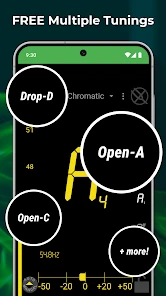
DaTuner is an Android chromatic tuner and metronome with a free, ad-supported download and paid features. Auto-sensitivity, a large note display and adjustable reference frequency make it useful for guitar, bass, violin and other instruments. Trumpet players can use it too; it is not limited to stringed instruments.
The screen changes color when you reach the target pitch. You can lock a note to avoid the display jumping to another target while tuning. The developer lists strobe display, transposition and temperament tools among the Pro features, so the free download should not be confused with the complete paid edition.
9. Guitar Tuner Pro
View Price: Google Play | App Store (Apple)
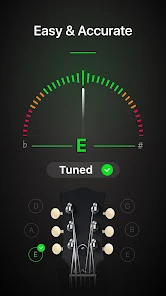
Guitar Tuner Pro lets you reliably tune your guitar, bass, or ukulele. The software is ideal for beginners, intermediates, or advanced guitar players learning how to tune their instruments easily.
With the app, you can pick between manual or automatic mode and use a chromatic tuner. Its chord library is a useful extra, but the complete chord collection, metronome options, training games and ad removal are premium features rather than a promise of the free download.
The iPhone listing is now called Tuner Pro: Guitar Tuner & Tab and requires iOS 16 or later; the Android listing retains Guitar Tuner Pro in its name. It is worth considering for its practice tools, but choose a simpler free tuner if you only need a pitch display.
10. Guitar Tuner Guru
View Price: Google Play
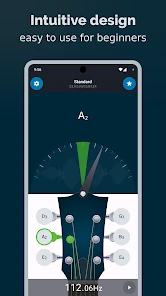
Guitar Tuner Guru is the current name of Tabs4Acoustic’s Ultimate Guitar Tuner. The Android app includes chromatic tuning, string detection and reference sounds for instruments such as guitar, bass, ukulele and mandolin.
The app can be used for electric and acoustic guitars and works by analyzing signals from the phone. The app’s layout is easy to understand and gives clear instructions so you can make the proper adjustments to your guitar.
The free download includes ads and offers in-app purchases. Its alternate-tuning presets and adjustable reference pitch make it worth a look if standard tuning is not enough for your playing.
11. Cifra Club Tuner
View Price: Google Play | App Store (Apple)
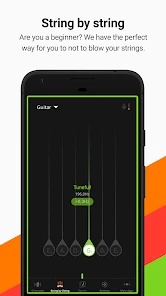
Cifra Club Tuner is another easy and free way to approach guitar tuning. With this app, you can tune any string instrument to your liking, including the guitar, bass, ukulele, violin, and more.
The chromatic display uses color to show whether to tighten or loosen a string, and the string-by-string mode gives more guidance. Cifra Club Pro adds instrument-specific tunings, noise and precision filters, a different theme and ad removal. Those extras are paid; the basic tuner remains the reason to try the free app.
12. smartChord
View Price: Google Play
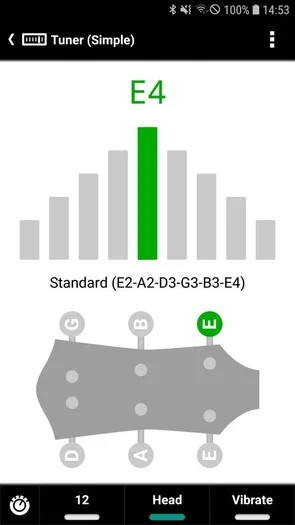
smartChord is an Android music toolkit with a free tuner, chord library, arpeggios, scales and fretboard tools. It suits guitarists who want several practice tools in one app rather than a dedicated tuning screen alone.
It offers a tuning option for guitar as well as bass, ukulele, and other instruments. It even has a metronome function for practice sessions which is a cool little feature to keep in mind.
The tuner has simple, detailed, string-change and pitch-pipe modes. The simple view is useful for everyday tuning, while string-change mode helps when fitting new strings. The wider app has optional paid feature packages; downloading smartChord does not unlock every tool.
13. Guitar Tuner – Simply Tune
View Price: Google Play | App Store (Apple)
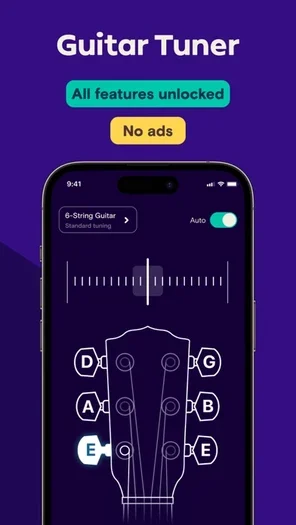
Simply Tune is a free guitar, bass and ukulele tuner from Simply, formerly JoyTunes. It is available for Android as well as iOS. The developer describes the tuner as completely free, with a chord library and common alternate tunings.
The app has automatic and manual tuning modes. Automatic mode recognizes the closest string, while manual mode lets you choose the target string. Step-by-step instructions explain whether to tighten or loosen it. The current iPhone app requires iOS 15 or later; this free tuner is separate from the paid Simply Guitar learning service.
14. CarlTune
View Price: Google Play | App Store (Apple)
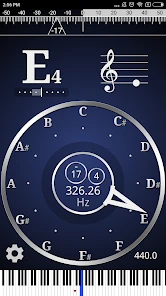
CarlTune is a free guitar tuner app with a color-by-choice display that shows pitch deviation in cents. Apart from guitars, it also supports bass guitar, ukulele, violin, viola, cello, double bass, mandolin, and more.
CarlTune includes guitar presets and a custom tuning interface alongside its chromatic display. You can change concert pitch and transpose for instruments such as clarinet, trumpet and saxophone. All tuning features are free with ads; an optional purchase removes the ads. The current iPhone version requires iOS 13 or later.
15. PitchPerfect Guitar Tuner
View Price: Google Play
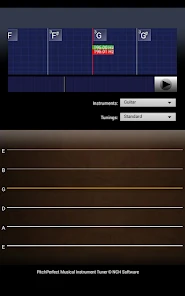
PitchPerfect Guitar Tuner is NCH Software’s free Android tuner, with ads and in-app purchases listed on Google Play. It automatically detects the note played and shows whether it is sharp or flat. This is an older Android app, so its availability for your phone depends on the compatibility shown in Google Play.
The app also supports instruments such as cello, bass, double bass, mandolin, ukulele, violin and viola. Automatic note detection lets you work toward drop or open tunings without treating standard tuning as the only target. It is a basic option for a compatible device; Fender Tune or Simply Tune offers a more current starting point.
How Accurate Are Guitar Tuning Apps?
Guitar tuning apps can be accurate enough for everyday practice when the microphone receives a clear note. Background sound, a weak signal and other strings ringing can make the reading less stable. Mute the other strings, pluck one note at a time and let it settle before adjusting.
A dedicated tuner is not automatically more accurate just because it is separate hardware. Its practical advantage is often how it receives the signal: a clip-on senses instrument vibration, while a pedal takes an electrical input. Both are easier to use when a phone microphone is hearing the rest of the room.
Should I Buy a Guitar Tuner or Use an App?
Apps are good for beginners and casual tuning at home or in quiet places. However, once you start performing in groups, studios, or on stage, it will be easier to use a guitar tuner.
At a gig, a clip-on or tuner pedal keeps your phone out of the process and is less affected by room noise. A pedal can also mute an electric guitar while tuning. For quiet home practice, a free app is often enough.
Summary
For guitarists of all levels, tuning devices are a must-have. They are one of the first accessories you’ll need once you acquire a guitar.
For a free starting point, Fender Tune combines tuning with practice tools, while Simply Tune offers guided tuning on both Android and iOS. Pano Tuner and gStrings are useful alternatives if you prefer a chromatic meter and more tuning controls.
Choose an app that supports your phone and the tunings you use. Keep the difference between a free tuner and a paid practice subscription in mind, and use a dedicated tuner when the playing environment makes a microphone app awkward.