The 7 Best Budget Studio Monitors for Home Studios (2026)
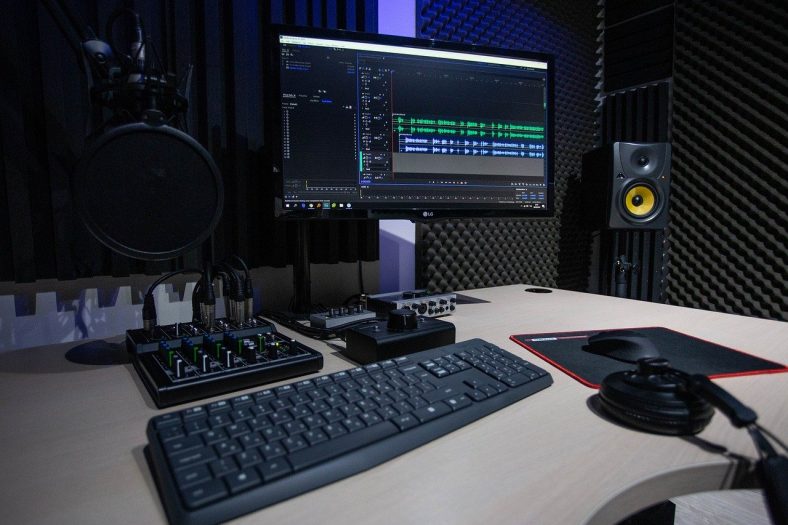
Studio monitors should be at the top of your list when setting up your music studio. You need to be able to hear your music properly to make the correct production and mixing decisions. It’s an absolutely vital part of music production!
When it comes to home studios, starting can be a pretty expensive venture. That is why it’s good to look for budget options, especially when it comes to studio monitors. I’m going to show you 7 of the best budget studio monitors currently available. This is not a definitive list as there are many different brands and models of monitors out there.
My top pick is the JBL Professional 305P MkII. If you want very well-balanced sound and quality monitors, these are the top choice for a reason!
My budget pick is the Mackie CR3.5 (Pair). If you want an even more affordable yet satisfying option then I suggest you give these a try, a pretty well-rounded set.
Contents
- The 7 Best Budget Studio Monitors (2026)
- 1. JBL Professional 305P MkII
- 2. Mackie CR3.5 (Pair)
- 3. PreSonus Eris 3.5 2nd Gen (Pair)
- 4. Yamaha HS5 Powered Studio Monitor
- 5. KRK Rokit RP5 G5 (Single)
- 6. Edifier R1280T
- 7. M-Audio BX4 Studio Monitors
- Do you need two studio monitors?
- Can you use studio monitors to listen to music?
- Do I need studio monitor stands?
- How does room treatment affect the sound of studio monitors?
- Should I get Headphones or Studio Monitors?
- What is the optimal Monitor Placement/Positioning?
- What to look for in Studio Monitors when buying?
- Summary
The 7 Best Budget Studio Monitors (2026)
Let’s compare these in more detail.

1. JBL Professional 305P MkII
JBL 305P MkII is a great, mid-range, powered studio monitor for all purposes. It comes as a single monitor device, so beware that you would need to buy two to get a pair. The 305P MkII has a 5-inch woofer; the larger 306P and 308P are separate models. The linked 305P MkII offers are for one monitor, so order two for stereo. For the connection, you can use XLR and TRS inputs which are balanced.
You can also control input sensitivity with a switch on the back where you will also find an HF TRIM switch to adjust your sound even more if need be.
Also, boundary EQ can be used to adjust the sound when the speakers are close to walls or other objects. On the front, JBL’s own Image Control Waveguide will give you a large sweet spot in which you can listen to the sounds this baby provides. All in all, this is a great, mid-range monitor that will last you for years.

2. Mackie CR3.5 (Pair)
Mackie CR3.5 is the current small CR-series pair and a useful budget option for a desk that doubles as a recording and listening space. The 3.5-inch woofers and silk-dome tweeters keep the cabinets compact, although they cannot reproduce the deepest bass like larger monitors.
The black cabinets retain Mackie’s familiar green accents. The front tone control lets you switch from a relatively neutral recording balance to a fuller sound for everyday listening. Leave it fully left when judging a mix, and use the desktop/bookshelf switch to suit the placement.
For connectivity, the pair has balanced TRS inputs, RCA inputs and a stereo mini-jack input. The front headphone output and volume knob make it convenient for a small desk, with one powered speaker driving the second through the included speaker wire.
These are a practical first pair for recording demos and editing music or video in a small space. Keep the listening level sensible and check low bass on headphones or another system before committing to a mix. The linked CR3.5 is the wired pair, not the separate Bluetooth model.

3. PreSonus Eris 3.5 2nd Gen (Pair)
PreSonus Eris 3.5 2nd Gen is a great example of a quality, affordable, small studio monitor that will equip you with great sound output. In this package, you will get two speakers, as well as the cables you need to connect them properly.
The monitors themselves have 3.5” woofers as well as the 1” tweeter in front, together with a headphone output and aux input, a volume knob, and a power button. On the back, you’ll find RCA input and two ¼” jacks, as well as the knobs for the acoustic tuning.
Acoustic tuning is rarely found in this category of monitors and allows for more pristine sound output, even though these monitors are not full-sized studio monitors.
They can pack a punch if you want them to since the pair has 50 watts of amplification in total, with 25 watts for each speaker. All in all, this is a great buy for anyone looking to get quality small studio monitors for a great price.

4. Yamaha HS5 Powered Studio Monitor
If you’re looking to go higher class, the Yamaha HS5 is a great way to start. Coming from an iconic manufacturer, the HS5 continues Yamaha’s focus on honest studio monitoring. The linked offers are for one standard black HS5; order two for stereo. The white version and HS5 MP matched-pair package are different listings.
This monitor comes with a 5” woofer and a 1” tweeter dome. It has a total power of 70W, so be careful when turning the volume knob all the way. You can also change room control, high trim, and the input level of the monitor.
These are all high-end options that will allow you to achieve the best sound possible. For connection, you can use XLR and TRS jacks. Even though these usually come at a higher price than most of the others on this list, you will get a high-end product if you decide to open your wallet.

5. KRK Rokit RP5 G5 (Single)
KRK Rokit RP5 G5 is the current 5-inch model, with a Kevlar woofer, silk-dome tweeter and onboard DSP. Its rear LCD gives you access to the EQ settings and three voicings: Mix for judging a recording, Create for a more lively playback balance, and Focus for concentrating on the midrange.
The KRK Audio Tools app helps you assess placement and room response, but it does not wirelessly control the speaker. Make adjustments on the monitor itself. The XLR/TRS combo input suits an audio interface, and the included foam pad and interchangeable faceplates add useful flexibility.
This is a good option if you want more control over how a small studio monitor fits your room. Keep both speakers on the same settings when mixing. Both links are for one black RP5 G5, so a stereo setup requires two monitors.

6. Edifier R1280T
The Edifier R1280T is a compact powered bookshelf pair for readers who mainly want music playback and occasional desk-based recording. Its wood-effect cabinets look at home in a living space. It is a consumer speaker rather than a neutral studio reference, so the JBL or Yamaha is the better choice for making detailed mix decisions.
These monitors, aside from amazing aesthetics, come with some handy components and options. They have two stereo RCA inputs, volume, bass, and treble options, as well as a very good sound quality considering the price of these.
With moderate durability, these monitors make for a great addition, not only quality-wise but also aesthetic-wise. A home studio with great sound and great looks!

7. M-Audio BX4 Studio Monitors
The M-AUDIO BX4 are absolute beasts considering the price. These affordable yet good quality monitors offer a very good quality sound while being quite sturdy in construction.
Very well-rounded 4.5″ speaker monitors that come with an MDF cabinet and bass-reflex design for great sound and quality bass notes. It also features low-frequency drivers and natural silk dome tweeters.
The best thing about the M-AUDIO BX4 monitors is their versatility and wide applicability. If you’re also looking to use these monitors for things like DJ speakers, or movie speakers, or if you simply need good quality desk speakers, these will be more than a good choice!
The M-AUDIO BX4 are a popular choice for a reason. A very well-rounded base that offers superb sound quality and durability. An excellent value for price choice!
Do you need two studio monitors?
It’s recommended to use two studio monitors. Most importantly, you can’t hear stereo sound when using just one monitor. So, it’s highly recommended to get a pair of monitors, so you’re not just hearing all of the sounds in mono!
Can you use studio monitors to listen to music?
If you will be using studio monitors in the production of music, then you should listen to your music through monitors to train your ears to the sound they produce. Studio monitors offer a different frequency range and overall different frequency response, hence the need to train your ear and get used to them.
However, if you’re looking to just buy speakers for music listening then they might not be your best option. The reason is that these monitors flatten the sound, portraying it as clearly and as close to the original sound recorded as possible. If you want to hear tons of bass, then you’re not necessarily going to get them through near-field speakers like this.
Do I need studio monitor stands?
Studio monitor stands can help you place the tweeters near ear height and keep the speakers off a resonant desk. Isolation pads can also reduce vibration reaching the desk, although neither replaces sensible speaker placement.
Comb filtering happens when reflected sound combines with the direct sound and produces peaks and dips. A desk can contribute reflections, so moving the speakers and listening position often helps. Use stands if they make the placement easier, and add room treatment where needed.
How does room treatment affect the sound of studio monitors?
The sound of your room affects the sound a LOT. No matter how expensive your studio monitors are, you need to put a bit of work into room treatment. This includes cutting off sound bouncing or reflecting off walls or surfaces in the room. If you are using an untreated room, it can be particularly difficult to get an accurate sense of bass.
The topic of room treatment certainly exceeds the scope of this article so make sure to do some research on this topic. If you’re putting some effort into your studio monitors, you should also put an equal amount of effort into acoustically treating the room you’re going to be working in.
Should I get Headphones or Studio Monitors?
Both studio monitors and headphones have their strengths. Studio monitors deliver a more accurate soundscape, making them an essential tool for home producers. Headphones, on the other hand, allow for a more intimate experience. They are also more portable and provide good isolation for the work environment.
Depending on your budget, I’d recommend having a good pair of studio headphones around so you have better isolation when you’re working on your mix. Not to mention, if you have neighbors, headphones are the way to go to avoid disturbing them when you work at night.
What is the optimal Monitor Placement/Positioning?
The optimal placement for your studio monitors is to have one on each side of your computer or laptop, forming a triangle where the distance between each monitor and yourself is the same.
To put it into words, you are in the middle bottom frame, one monitor is on the right top frame behind the computer, and the other one is on the top left frame, with the distance being equal from all three points to each other. Naturally, you’ll have your monitors angled slightly toward you for better projection.
What to look for in Studio Monitors when buying?
Studio monitors are very important when it comes to music production so it’s only reasonable to spend some time choosing the right ones and making a safe purchase.
Firstly, the sound quality of the monitor needs to be a top priority! Look for a balanced response, clear stereo imaging and enough clean output for your listening distance. Small monitors have limited deep-bass extension, so a larger woofer alone is not a substitute for checking your room and placement.
Secondly, a good studio monitor speaker also needs to be durable and have sturdy components in order to last you a decent amount of time! When it comes to the best cheap studio monitors you need to carefully consider and research the durability of the product, as the best cheap does not mean the overall best studio monitors.
Obviously, you need to consider your price range and not drive yourself broke in order to attain the best option for your recording studio. Sometimes it’s also good to have some spare for acquiring good audio interfaces or spend a few on room acoustics.
Lastly, if you can manage to get your hands on monitors with extra features that would only benefit you. You have lots of different options that can be useful like Bluetooth connectivity, extra bass ports, a headphone output, and basically anything that can add variety and also improve versatility.
Summary
You need to have the good sound quality to make great music. If you’re producing music on a pair of old tin cans or a bad set of headphones, you’re missing out on a LOT. Although these are still budget options, they are very good ones to consider!
My top recommended option is the JBL Professional 305P MkII. If you want a well-rounded choice that offers great sound and durable build, all the while at a reasonable price, then you’ll not find a better option.
My second recommended option is the Mackie CR3.5 (Pair) for those on a tighter budget but who still want a decent pair of speaker monitors!