The 7 Best Audio Mixers for Recording, Mastering, and Mixing (2026)
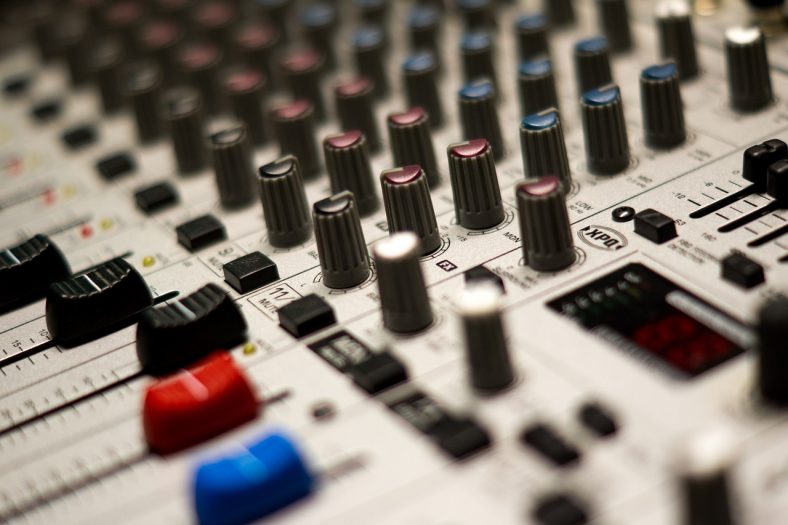
Audio mixers are essential parts of any live or recording setup. They collect audio signals from various sources blending and processing them as desired before sending them to external amplification or recording equipment.
There are many mixers on the market which can be overwhelming and confusing to choose the best one. A standard analog mixer is usually cheaper and easier to use. A digital mixer is more complicated and versatile as it converts analog signals to digital signals before processing them with a variety of features including presets, effects, automation, and other functions.
My top audio mixer recommendation is the Mackie ProFX12v3+, which is a great audio mixer for the price with its portable design, and handy features.
For tighter budgets, I suggest the Behringer Xenyx X1222USB 16, an analog audio mixer with a great value for the offered price and simple yet reliable features.
Contents
- The 7 Best Audio Mixers for Recording, Mastering, and Mixing (2026)
- 1. Mackie ProFX12v3+
- 2. Behringer Xenyx X1222USB
- 3. Allen & Heath ZED-14
- 4. Yamaha MG12XU
- 5. PreSonus StudioLive 16.0.2 USB
- 6. Zoom LiveTrak L12next
- 7. TASCAM Model 12
- How does an Audio Mixer work?
- What is the difference between an Audio Interface and an Audio Mixer?
- How important are built-in effects?
- How long do Audio Mixers last?
- What to look for in an Audio Mixer?
- Conclusion
The 7 Best Audio Mixers for Recording, Mastering, and Mixing (2026)



Let’s compare these in more detail.
For recording, check how many separate tracks the USB connection sends to your computer. The Mackie, Behringer, Allen & Heath, and Yamaha here record two channels over USB; the PreSonus, Zoom, and TASCAM can record individual channels. A stereo mixer is enough to capture a finished live mix, while multitrack recording gives you more freedom to fix the balance later.
1. Mackie ProFX12v3+
Mackie ProFX12v3+ is my top pick for home studios that want a portable analog mixer for stereo recording, streaming, and small live performances. It keeps the Onyx preamps and straightforward controls of the ProFX12v3, while adding USB-C, editable effects, and Bluetooth. It is an analog mixer with digital effects and an audio interface, rather than a fully digital mixing console.
Pros
- 2-channel USB-C recording with three recording modes
- Seven Onyx mic preamps and editable GigFX+ effects
- Compact, portable construction
- Bluetooth playback and caller integration
- Direct monitoring with a headphone blend control
Cons
- Does not record every mixer channel separately over USB
- No MIDI connectivity
You get 12 input channels, seven microphone preamps, three-band EQ, and one-knob compression on channels 1 to 4. The 2-in/4-out USB-C interface supports up to 24-bit/192kHz. GigFX+ has 12 editable presets, with a color display for making and saving effect adjustments.
The recording modes are useful if you work with both music and spoken audio. Standard records the main mix with effects, Loopback combines mixer and computer audio for streaming, and Interface records channels 1 and 2 dry. The headphone blend control lets you hear the live inputs alongside the computer return.
All these features in a compact design make a practical home or small-gig mixer. The limitation is important for band recording: a 12-channel mixer is not necessarily a 12-track interface. Choose the StudioLive, Zoom, or TASCAM below if you need separate tracks to edit after recording.
| Number of input channels | 12, with 7 mic preamps |
| Connectivity | USB-C (2 in / 4 out), Bluetooth |
| Effects engine | GigFX+ |
| Effects presets | 12 editable presets |
| Compatibility | Mac, PC |
For a compact mixer that can handle rehearsals, stereo recordings, and live streams, the ProFX12v3+ is a useful all-round choice. You get the familiar hands-on analog workflow with recording options that are easier to adapt to different projects.
2. Behringer Xenyx X1222USB
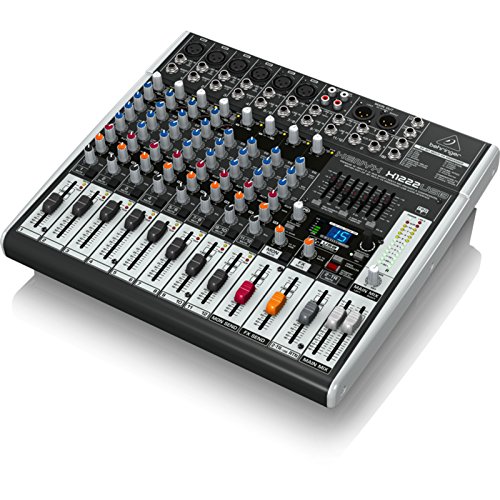
Behringer Xenyx X1222USB is a 16-input analog audio mixer designed for home studios and small live venues. It is a pretty portable mixer with its compact and lightweight design and is pretty versatile for the price with its dual-engine Multi-FX processor including delay, flanger, chorus, reverb effects.
Pros
- Great value for the price
- Compact and portable
- 6 Xenyx mic preamps
- Decent sound-sculpting features
Cons
- Designed for smaller applications
- Not the greatest line of effects
The audio mixer has a good range of sound-sculpting features with a 3-band EQ for each channel and a 7-band graphic equalizer for further customization. There are 8 TRS and 2 RCA inputs, with 6 of the XLR inputs featuring Xenyx mic preamps delivering clear sound.
It does not have an extensive line of effects as digital audio mixers, as it is still a budget analog mixer.
| Number of inputs | 16, with 6 mic preamps |
| Connectivity | USB (2 x 2) |
| Effects Engine | Dual engine Multi-FX processor |
| Number Of Effects | 16 |
| Compatibility | Mac, Pc |
To summarize, Behringer Xenyx X1222USB is a good audio mixer for home studios, podcasting projects, and small live performances to get the job done at a budget-friendly price.
3. Allen & Heath ZED-14
Allen & Heath ZED-14 is a popular audio mixer among home studios and live recording setups. It has six mic/line channels and four stereo channels, with DuoPre preamps providing transparent sound, three-band EQ on each mono channel, and two-band EQ on each stereo channel.
Pros
- Solid build quality
- 14 inputs to work with
- DuoPre preamps sound quite good and have up to 69 dB of gain
- Big faders are easy and fun to use
- 2 pre-fade and 2-post fade AUX ports
Cons
- Audio interface fixed at 16-bit
- USB 1.1 (but USB 2 compatible)
- No EQ-bypass
ZED-14 is a well-specified analog audio mixer for the price. The XLR inputs provide phantom power for condenser microphones, and the latest technology, DuoPre preamps, allows up to 69 dB of gain in the signal. Its stereo USB connection lets you capture a mix on your computer, though it does not record every channel separately.
Furthermore, there are long 100mm faders on the control board, making it easy and fun to play with. Another great feature is the 2 pre-fade and 2 post-fade AUX ports, which are not common in mixers in this price range.
| Number of inputs | 14 (6 mono, 4 stereo) |
| Connectivity | USB (2 x 2) |
| Effects Engine | None |
| Number Of Effects | None |
| Compatibility | Mac, Pc |
Overall, Allen & Heath ZED-14 is a great analog audio mixer for the price. The USB 1.1 port and audio interface fixed at 16-bit resolution are the only letdowns. Also, some users would find the lack of EQ-bypass frustrating, but if the USB and EQ-bypass are not a problem for you, ZED-14 is a great choice.

4. Yamaha MG12XU
Yamaha MG12XU is a compact 12 channel mixer that combines the ease of use of an analog mixer with built-in digital effects, making it a great and versatile audio mixer. It comes with onboard effects and great sound quality provided by D-Pre preamps in a highly compact and lightweight design.
Pros
- Great sound quality
- Versatile with 24 onboard effects
- Compact and portable design
- D-PRE preamps sound truly great
Cons
- Heats up a bit when in use
The mixer uses the SPX effects engine for its 24 onboard effects, including reverb, delay, phaser, chorus, and many more. Furthermore, it has a 3-band EQ per channel, single knob compressors, a pad switch, and switchable phantom power.
The letdown of this audio mixer is that it gets pretty hot when in use. Another one is that the USB output level is relatively low, but with a good DAW, it can be boosted easily.
| Number of channels | 12 |
| Connectivity | USB (2 x 2) |
| Effects Engine | SPX |
| Number Of Effects | 24 |
| Compatibility | Mac, Pc |
All these features in a compact design for the offered price make Yamaha MG12XU a great product. If you are after a great audio mixer for recording a small band or use it in different projects in your home studio, Yamaha MG12XU would be a great choice.
5. PreSonus StudioLive 16.0.2 USB
PreSonus StudioLive 16.0.2 USB is a feature-packed digital audio mixer that comes in a surprisingly small design. The shining star of the mixer is the remote control option from a laptop, iPad, or iPhone using Universal Control.
Pros
- Feature-packed yet portable and intuitive design
- Remote control option
- Great software bundle
- Fat channel signal processing
Cons
- No motorized faders
The compact audio mixer is equipped with eight mono channels and four stereo channels, a MIDI control interface, an 18-in/16-out USB 2.0 interface for recording and playback, and 2 x stereo 32-bit digital effects processors. It also comes with a great software bundle including recording software, Capture, Universal Control, and QMix-UC.
Furthermore, the fat channel function is great, which allows for more dynamic, and EQ changes like compressor, limiter, bus assignments, etc., for the selected channel, along with the ability to save and recall settings.
| Number of input channels | 16 (8 mono, 4 stereo) |
| Connectivity | USB (18 in / 16 out) |
| Effects Engine | 2 x stereo 32-bit digital effects processors |
| Number Of Effects | Delay and Reverb |
| Compatibility | Mac, Pc, iOS, Android |
When used with computers or smart devices, the mixer has been criticized for the lack of driver updates. Users were also not happy with the mixer’s lack of motorized faders. But overall, it’s a versatile, feature-packed audio mixer that shines as a standalone mixer as well as for studio recording with other devices.
6. Zoom LiveTrak L12next
Zoom LiveTrak L12next replaces the discontinued L-12 and is a strong choice for bands that want mixing, multitrack recording, and individual monitor mixes in one device. It keeps the familiar faders while adding more direct channel controls, upgraded preamps, and an OLED display. You can record a rehearsal without bringing a computer.
Pros
- Mixer, USB audio interface, and standalone multitrack recorder
- Five independently adjustable monitor outputs
- Hands-on channel EQ, compression, and send controls
- Records to computer and card at the same time
- Scene recall, overdubbing, and auto punch-in/out
Cons
- Individual card tracks are 24-bit, not 32-bit float
- Fader positions are not motorized
The L12next has 12 input channels, including eight microphone inputs, and records up to 12 individual tracks plus the stereo mix. Individual card tracks can be captured at 24-bit/96kHz; the master mix uses 32-bit float. Its 14-in/4-out USB interface also supports 32-bit float, so the format depends on where and what you are recording.
Five monitor outputs let each player have a different cue mix. This is especially helpful when a singer needs more vocals and a drummer wants more bass or click. Three multifunction encoders per channel put gain, EQ, compression, pan, and sends within reach rather than making every change through a menu.
The updated preamps offer up to 70dB of gain, while scene memories help you return to a familiar band setup. Overdub and auto punch-in/out make the recorder more useful for building songs, although the non-motorized faders still need attention when recalling a different mix.
| Number of input channels | 12, with 8 mic inputs |
| Connectivity | USB (14 in / 4 out), microSD recording |
| Effects | Built-in send effects and channel processing |
| Monitoring | 5 independent monitor outputs |
| Compatibility | Mac, PC, mobile devices |
The L12next is a good fit for rehearsals, live recordings, and home sessions where several musicians need their own monitor mix. You can take the separate recordings into your preferred workflow for mixing and mastering, or work on an arrangement with the onboard recorder.
7. TASCAM Model 12
TASCAM Model 12 combines a hands-on mixer, standalone recorder, USB interface, and DAW controller, making it more useful at the center of a home studio.
Pros
- Standalone 12-track recording to SD card
- 12-in/10-out USB audio interface
- DAW control and MIDI connections
- Channel compressors and a master EQ
- Two headphone outputs with separate level controls
Cons
- Ten input channels rather than twelve separate mic inputs
- Maximum sample rate is 48kHz
There are ten input channels and eight Ultra-HDDA microphone preamps. The recorder captures the ten input tracks plus the left and right main mix, which explains the twelve-track name. You can record directly to an SD card, use USB to capture the tracks on a computer, or bring recorded tracks back through the mixer.
One-knob compressors and three-band channel EQ help you shape the signals while keeping physical controls under your fingers. The master EQ gives you another place to balance the whole mix. MIDI and DAW control are useful if you want the mixer to remain part of the process after the initial recording.
It is still a compact mixer, so check the input count against your band or microphone setup. The maximum 48kHz recording rate is enough for many home projects, but it will not suit a workflow that specifically needs higher rates. It also has no built-in power amplifier; use powered speakers or a separate amplifier for live sound.
| Number of input channels | 10, with 8 mic preamps |
| Recording | 12 tracks to SD card, including stereo mix |
| Connectivity | USB (12 in / 10 out), MIDI |
| Processing | Channel EQ/compression, effects, master EQ |
| Compatibility | Mac, PC |
If you want to mix vocals, guitars, and keyboards together and keep individual tracks for later editing, Model 12 is a practical choice. The Zoom above is better for a band needing five personal monitor mixes; the TASCAM is particularly appealing for songwriters who want hands-on recording and DAW control.
How does an Audio Mixer work?
Audio mixers have mixing circuits and master channel meters. The mixing circuit receives audio from microphones, instruments, or various audio sources. Before sending them to the recorder or output, the mixer combines and balances the audio. The meters help you monitor its level before it reaches the audience or recorder.
A standalone audio mixer allows you to connect microphones, instruments, and other line-level audio sources to itself. On the mixing console panel, you can blend all different audio sources into one audio stream. Depending on the features of the mixer, you can control the volume of individual audio signals customize the EQ and panning.
Some audio mixers also have built-in effects like compression, reverb, and delays which you can use for each channel. After you customize all you need for each channel, through an output, the blended stereo signal is sent to the desired output device such as headphones, PA system, or speakers.
Some audio mixers also have built-in audio interfaces, which allow you to connect them to your computer, often with a USB cable, to record your mix in your DAW.
What is the difference between an Audio Interface and an Audio Mixer?
An audio mixer is designed to mix, blend and balance signals from different audio sources into one stereo sound stream. Audio interfaces’ main goal is to receive signals from the audio sources and record them into the computer. Some audio mixers come with built-in audio interfaces for recording.
How important are built-in effects?
Built-in effects in an audio mixer make everything more convenient for users. Although you can get your effects from additional gear, and it is not ultimately necessary to have them in a mixer, having basic effects like compression, reverb, and delay onboard make everything easier.
How long do Audio Mixers last?
An audio mixer can last five to ten years when taken care of properly. Although the lifetime of a mixer heavily depends on many aspects such as construction, use, circuit system, etc., most audio mixers last a minimum of five years.
What to look for in an Audio Mixer?
When buying an audio mixer, the key features you should check are the channel count, EQ, effects, portability, compatibility, and connectivity. To find the ideal audio mixer for your needs, you should consider the questions; with how many audio sources, how and where you will use the audio mixer.
Channel Count
Arguably the most critical feature of an audio mixer is the channel count. Depending on how you will use the audio mixer, you will need a different number of channels. If you are mixing some microphones for podcasts, you can go with a small audio mixer with a limited number of channels; however, if you will be working with music bands, for instance, you need a big audio mixer with a high number of channels.
EQ
One of the most important aspects of an audio mixer is the EQ. A good audio mixer should have 3-band EQ for each individual channel and a more extensive main EQ for the final mix.
Effects
Although you can get your effects from other devices or plug-ins, it is highly convenient to have at least basic effects on your audio mixer. Effects like compression, delay, and reverb are commonly found on most audio mixers.
Portability
Portability becomes crucial if you use the audio mixer outside the studio for live gigs or recordings. A lightweight, compact device would serve you better when carrying it around. Of course, in that case, you should also consider the construction quality, as you would not want it to be easily damaged or broken. But, if you will be using the mixer mainly in the studio without moving it often, you can skip this aspect.
Compatibility
Another critical point is the compatibility of the audio mixer. Suppose you want to use the device connected to computers or smart devices, especially those with built-in audio interfaces. In that case, you should check if the device is compatible with your computer, smart device, and operating system.
Some audio mixers are well integrated with some particular DAWs, which can be another plus if you want to use that particular DAW.
Connectivity
And finally, the connection types and number of input-output ports are also important. If you are using many mics, you should go for a mixer with enough mix preamps and phantom power if necessary. If you use many line-level sources, you should ensure the mixer has enough line inputs.
Plus, the number of outputs is also important; besides the main output, you might need additional aux sends for stage monitors, some inserts or effect sends for outboard effects processors, and also a headphone out to listen to your mixes.
Conclusion
There are many different audio mixers on the market with different features answering different needs. To get the most suitable one for yourself, you should decide your needs and go for a high-quality, versatile one that would serve you well.
My top pick is the Mackie ProFX12v3+, as it is a compact, high-quality analog mixer with digital effects and useful USB recording modes that can serve well for different kinds of projects.
For tighter budgets, I recommend the Behringer Xenyx X1222USB 16, a reliable analog audio mixer for home studios and basic live performances.