Ableton Live vs Logic Pro – Which Is Better? (2026)
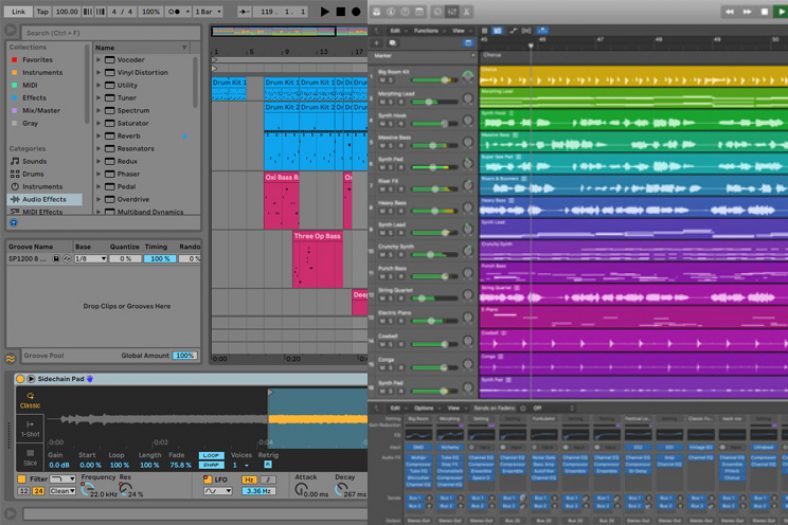
Choose Ableton Live for a clip-based performance workflow and a desktop project that can move between Windows and Mac. Choose Logic Pro for Mac if you want its recording, scoring, and included instrument workflow on an Apple computer. Both can record, arrange, edit, and mix complete songs, and both now offer a loop-based way to develop ideas.
This comparison covers Ableton Live 12.4.6 and Logic Pro for Mac 12.4. Logic Pro for iPad is a separate app with its own platform requirements; the Mac plugin and licence details below do not automatically apply to it.
The useful differences are the workflow, included devices, licence, and computer you can use. Your genre alone does not make either DAW the right choice.
Contents
- Key Differences Between Ableton Live and Logic Pro
- Licences and Editions
- Arrangement Views
- Session And Loop-Based Views
- C.P.U. Usage
- Hardware And Software Controllers
- Working With Audio
- Working With MIDI
- Plugin Compatibility (VST vs AU)
- Stock Instrument Plugins
- Creating Drum Tracks
- OS Compatibility
- Ableton Live 12 Standard
- Ableton Live 12 Suite
- Logic Pro for Mac
- GarageBand for iPhone and iPad
- Verdict
Key Differences Between Ableton Live and Logic Pro
- Ableton Live has versions for both Mac and Windows; the desktop Logic Pro app is for Mac. Logic Pro for iPad is a separate app.
- Ableton Live has a powerful grid-based live performance view (called the session view), which, in my opinion, is still much better than Logic Pro’s Live Loops workflow.
- Regarding external plugins, Logic Pro only supports the AU plugin format, whereas Ableton Live supports VST2 and VST3 formats for all versions, as well as supporting AU format when used on Mac.
- Both Logic Pro and Ableton Live have fantastic stock plugins (synths, effects, MIDI stock plugins, etc.). Both are extremely powerful, but if we’re splitting hairs about the included stock plugins and samples, Logic Pro excels in mixing and creating organic-sounding music, while Ableton Live excels at sound design and creating electronic-based music.
- Ableton Live comes in 3 different versions, whereas Logic comes as one single version. Choose a Live edition by its track limits and included devices. Standard and Suite both support complete recording and performance projects, while Suite adds instruments, effects, and Max for Live. For Logic, distinguish the Mac purchase from subscription access and from the separate iPad app.
- If you are collaborating with someone and want to sync with them perfectly, Ableton Live offers a ‘Link’ feature, which lets you share tempo information and be linked to each other if you are connected to the same Wi-Fi network.
- Logic Pro has been a go-to for those making film scores because of its vast library and professional quality mixing and mastering tools.
- Ableton Live has been a go-to for live looping due to its many tightly compatible hardware MIDI controllers, such as Ableton Push 3, AKAI APC 40 MKII, and Novation Launchpad. Though many third-party MIDI control surfaces work very well with Logic Pro, Logic Remote is Apple’s free iPhone and iPad control app.
Licences and Editions
Live 12 comes in Intro, Standard, and Suite editions. Intro limits projects to 16 audio and MIDI tracks; Standard and Suite allow unlimited tracks. Suite adds the full instrument and effect collection and Max for Live. The offers below distinguish the full Live 12 Standard and Live 12 Suite licences; choose Suite if you want its included instruments such as Operator or Wavetable. Existing owners should check their Ableton account for an upgrade rather than buy a full licence again.
Live 12 point updates are free for Live 12 owners. A licence is for one person and includes two computer authorizations, with one computer used at a time. Register and authorize the software through your Ableton account. Live Suite also has a developer rent-to-own option; that payment plan is different from buying Standard or starting a subscription.
Logic Pro for Mac is available as a standalone App Store purchase or through an Apple Creator Studio subscription. The subscription grants access while it is active; the separate Mac purchase does not require that subscription. Apple’s current Logic release notes cover both routes. Buy or subscribe using your Apple Account, and check that you are choosing the Mac app rather than the iPad app.
Arrangement Views
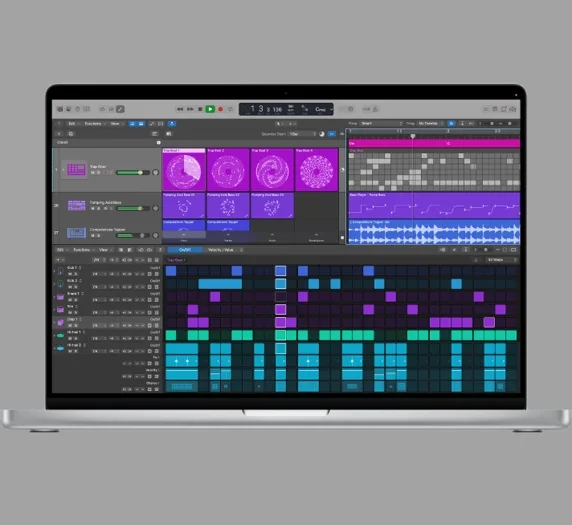
For those using a DAW for the first time, the visual layout of Logic Pro is easy to navigate. It follows a horizontal timeline. The clearly defined icons in the sound library help you make quick decisions so you can start writing or playing music efficiently.
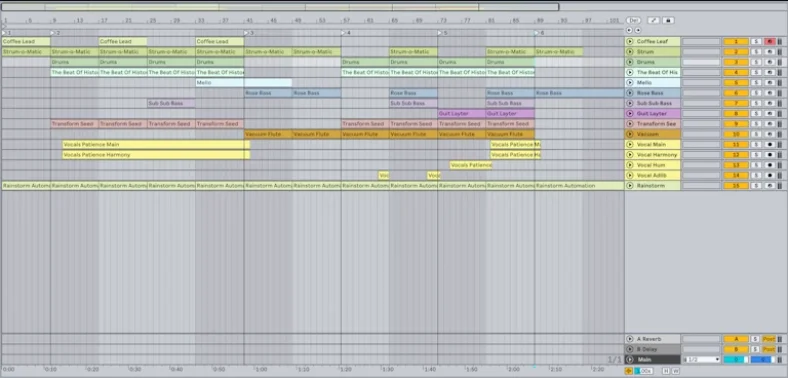
Ableton Live offers a similar Arrangement View, with tracks laid out along a horizontal timeline. Both DAWs also provide a mixer and a main output channel for processing the full mix. The difference is how you prefer to navigate between arranging, mixing, and launching clips, rather than whether one program can process its master output.
Logic’s timeline remains an approachable place to build a song from recorded performances. Live’s Arrangement View is also a complete recording and editing workspace, and it can capture a performance from Session View. If you mostly record linear takes, compare take editing and navigation in both rather than ruling out Live as a loop-only program.
Session And Loop-Based Views
Ableton Live was developed in 2001 by Bernt Roggendorf and Gerhard Behles with the additional objective of being a live performance tool apart from recording capabilities. This is why the user can choose from 2 very different views, the ‘Session View’ and the ‘Arrangement View.’
The Session View is grid-based. One can arrange and trigger samples and loops, known as “clips,” in any desired sequence. The Session View also has provisions for a mixer with individual faders and knobs to control volume, reverb, and delay.

So, this is a great tool for impromptu and improvised live performances.
Logic Pro introduced Live Loops in version 10.5. It lets you arrange audio and software instrument ideas in a grid, trigger cells and scenes, and record a grid performance into the Tracks area. I still prefer Ableton’s Session View for a performance built around launching clips, but Logic’s grid is a usable creative and performance tool, not just a preview before recording.

Logic can show its Live Loops grid beside the Tracks area in the same main window. In Live, you can use a second window to show Arrangement and Session Views at the same time. These are different window layouts, so try them on the display setup you actually use.
Live’s clip controls and Follow Actions let you set how clips and scenes launch and move on to the next idea. That flexibility is useful when you want some of an arrangement to change during a performance. Live 12.4 also adds Link Audio for streaming audio between compatible Link peers on a local network, alongside Link’s tempo synchronization.
So, in terms of Session View and live performances, Ableton Live is a better choice. While both DAWs now offer the grid-based Session View, Ableton is more experienced, focused, and versatile in this sense.
To see the ‘Arrangement View’ and the ‘Session View’ in action and have a better opinion check the video below.
C.P.U. Usage
Logic Pro is built around Apple’s platforms, and I’ve personally found its Mac workflow efficient. That original experience is not a benchmark of the current versions of these two DAWs.
A CPU result depends on the computer, audio buffer, plugin builds, instruments, track routing, and project. Live 12 has received multiple maintenance updates, so early complaints about a release do not establish how the current build will perform in your session.
For a useful comparison on Mac, use the same audio settings and a representative project in both DAWs. On Apple silicon, choose native plugin builds where available. If your projects depend on older plugins, check those alongside the DAW’s own requirements before upgrading.
Hardware And Software Controllers
Ableton’s current dedicated controller family is Push 3. It integrates with Live’s clip, instrument, and mixing workflow, but the hardware is a separate purchase. Other MIDI controllers for Ableton Live can also work with Live; check the specific model’s control-surface support instead of assuming every control will map automatically.
Logic Pro supports compatible MIDI controllers and control surfaces for Logic Pro, with the available integration depending on the model. Apple’s free Logic Remote app for iPhone and iPad offers another way to control the transport, mixer, instruments, and Live Loops from a touch screen.
Logic Remote can act as a musical input surface as well as a remote control. It may suit a small recording setup, while a physical controller can be preferable if you want faders, pads, or keys under your hands. Choose for the controls you use rather than treating the app as a replacement for every hardware workflow.
Working With Audio
Logic Pro has been lauded for how easy it is to record live instruments such as vocals, guitars, basses, etc. You can comp multi-tracks and group them into buses, making it very useful when recording something elaborate like a drum kit.
Additionally, the default sound library on Logic Pro is especially useful when recording string instruments because it offers various amp and pedal simulations that you can customize right down to the kind of mic and its placement.
Live introduced comping in version 11, not version 12. Live 12 includes take lanes and comping in all three editions, while linked-track editing is available in Standard and Suite. Both DAWs can record multiple tracks and combine the best parts of different takes. Logic’s included amp, pedal, and recording tools may suit a guitar-focused workflow, but Live is also capable of recording and editing a band.
Working With MIDI
Ableton Live was initially created for electronic musicians. This means that certain MIDI features on it are exemplary, such as the ability to quickly quantize intricate patterns, control velocity, and edit quickly. But the piano roll leaves more to be desired.
Logic Pro offers a more elaborate piano roll along with a bonus option to view your MIDI notes as a score. This is a very helpful tool for composers who prefer sheet music over just MIDI information. You can also export your score as a MusicXML file.
Plugin Compatibility (VST vs AU)

Logic Pro for Mac hosts Audio Units (AU) plugins. Live supports VST2 and VST3 on Windows and Mac, plus AUv2 and AUv3 on Mac. Neither desktop host is an AAX host. Choose a supported format and a plugin build that matches the operating system and processor; a Windows VST does not become a Mac plugin just because Live supports VST.
Many popular plugins are available in both AU and VST formats. If a plugin you need is VST-only, Live gives you a direct hosting route that Logic lacks. For a Live project that will move between Windows and Mac, use compatible VST versions on both machines rather than a Mac-only AU instance.
Stock Instrument Plugins
Ableton’s instrument range includes Impulse, Operator, Simpler, Sampler, Tension, and Wavetable, but the collection depends on the edition and any separately owned devices. Operator, Sampler, Tension, and Wavetable are Suite instruments in the current edition comparison; the full Standard offer here should not be read as including the entire Suite collection. Simpler is a useful place to start with sample-based parts.
Although they can be a little bit tricky to use at first, such as the sampler, a sampling device, they are a joy to work with if you have a little knowledge of synth hardware.
Ableton offers a pretty intuitive and straightforward workflow for producers. Many users who fear powerful wavetable synths or FM synthesis find Ableton’s approach to these essentials quite easy and quick to learn. Plus, the DAW offers some of the highest-quality synthesis and sampling tools with producer-friendly effects and amazing instruments.

Logic Pro includes acoustic-style instruments as well as sound-design tools such as Alchemy, Sample Alchemy, and Quick Sampler. Alchemy is worth exploring for synthesized and resynthesized textures, so Logic is not limited to organic instrument emulations. Its Session Players also provide ways to develop supporting parts around a song.
Logic features Flex Pitch and Flex Time audio editing capabilities, which are great for rhythm editing and vocal pitch correction. Normally, these features come with third-party plugins like Melodyne or Autotune. Plus, Logic Pro has studio-favorite virtual instruments such as the Rhodes electric piano or the Hammond B3 organ, which sound great.
On top of that, with the stock plugins like compressors and vintage EQ collection, the DAW has a pretty flexible character for high-quality records.
So, if you are more sound creation-focused, Ableton Live is a better choice with its synthesis and sampling tools. But, if you are looking for more traditional-focused recording techniques, Logic is the way to go with its key tools.
Creating Drum Tracks

Logic Pro’s Drummer workflow remains useful for a songwriter who wants to build a groove and adjust the performance to the song. Current Logic places acoustic and electronic drummers alongside other Session Players, including bass, keyboard, and synth players. You can shape the part rather than program every note from scratch.
Additionally, Logic Pro also has multiple electronic and acoustic drum sounds that can be programmed using MIDI.
Ableton Live‘s Drum Rack lets you build a kit from samples, instruments, and effects. You can sequence a kit with MIDI and change individual pad sounds as you develop the track. Drum Rack is included in all three Live 12 editions, while the supplied kits, Packs, and additional devices vary by edition.

A cool feature is swapping out the sounds on your drum rack. This means you can mix and match as you want, even adding your instrument or effects for either live or recorded performances.
Max for Live adds another route to instruments, effects, and custom devices. It is included with Live Suite and available as a separate purchase for eligible Live Standard owners; it is not part of the Standard licence shown here. It is useful for exploring devices made by other musicians as well as building or modifying your own.
OS Compatibility
Logic Pro for Mac 12.4’s standalone App Store listing requires macOS 15.4 or later. Apple’s Creator Studio requirements also specify a Mac with Apple silicon for Logic Pro. Check the exact download route and the requirements of features you need before upgrading an older Mac; the old Logic 10.7.9 requirements do not describe this release. Logic Pro for iPad has separate iPad hardware and iPadOS requirements.
For Live 12 on Windows, Ableton lists Windows 10 version 22H2 or Windows 11 version 22H2 or later, 8 GB of RAM, and a fifth-generation Intel Core i5 or AMD Ryzen processor with AVX2 support. Windows ARM systems use Prism emulation. The basic installation needs about 6 GB on the system drive, with additional space for sound content.
On Mac, Live 12 requires macOS 11.7.10 or later, an Intel Core i5 or Apple silicon processor, and 8 GB of RAM. Allow about 8 GB for an Intel installation or 10 GB on Apple silicon, plus up to 76 GB for optional sound content. Supported newer macOS versions differ between Intel and Apple silicon, so check Ableton’s compatibility list before a system upgrade. The application and third-party plugins also need authorization or licences of their own.
Ableton Live 12 Standard
Ableton Live 12 Suite
Logic Pro for Mac
GarageBand for iPhone and iPad
GarageBand is a free starting point for recording and making songs on Apple devices. The iPhone and iPad app and the separate Mac app have different interfaces and plugin support, so choose the one that fits the device you own.
GarageBand for iPhone and iPad includes Touch Instruments, audio recording, loops, and tools for building drum parts, with up to 32 tracks in a song. It is useful for sketching and finishing smaller projects, although it does not provide all of Logic’s recording, editing, and mixing tools. The Mac version has its own capabilities; the mobile track limit should not be applied to the Mac app.
You can share a GarageBand song as audio or move a compatible GarageBand project into Logic Pro to continue working. Check the sharing options on your platform, because the Mac and mobile export menus are different.
Verdict
Both DAWs have their strengths. For a performance built around clips and flexible sound design, I would start with Ableton Live. For a Mac recording setup that will use Logic’s included instruments, scoring, and Session Players, Logic Pro is an appealing choice. Before paying, compare the edition and licence against the tools you actually need.
Also, you do not have to pick just one DAW. Many musicians prefer to use a combination of both. Some use different DAWs depending on whether they want to write, they want to record, or they want to perform live. So take your time and explore both of them and see which one works best for you.